
Introduction
Data has become the lifeblood of modern organizations. Every online transaction, customer interaction, application update, and business process depends on data being available, accurate, and secure at all times. Yet system failures are inevitable. Hardware malfunctions, software bugs, storage failures, cyberattacks, and human errors can disrupt operations without warning. When these incidents occur, organizations need a way to recover quickly without losing critical information. This is where local continuous replication plays a crucial role.
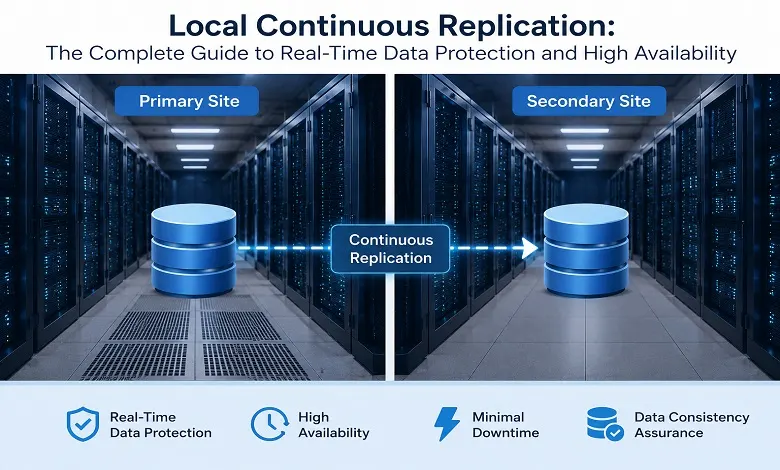
Local continuous replication is a technology that continuously copies data changes from a primary system to a secondary system within the same location or local network. Unlike traditional backups that occur at scheduled intervals, replication happens in real time or near real time, ensuring that the replica remains synchronized with the source.
For businesses that cannot afford downtime or data loss, local continuous replication serves as a cornerstone of high availability, disaster recovery, and business continuity planning.
What Is Local Continuous Replication?
Local continuous replication is the process of automatically and continuously duplicating data from a primary storage system, server, or database to a secondary replica located within the same site, data center, or local network.
Every change made to the source data is immediately captured and transmitted to the replica. This ensures that both systems remain closely synchronized.
The primary objectives include:
- Preventing data loss
- Improving availability
- Accelerating recovery
- Supporting business continuity
- Enhancing system resilience
In modern enterprise environments, replication is commonly used for databases, virtual machines, storage arrays, cloud infrastructure, and mission-critical applications.
Why Local Continuous Replication Matters
Organizations today operate in an always-on environment. Even a few minutes of downtime can have serious consequences.
Potential Impact of Downtime
- Lost revenue
- Reduced productivity
- Customer dissatisfaction
- Compliance violations
- Damage to brand reputation
According to multiple industry studies, downtime can cost large enterprises thousands—or even millions—of dollars per hour.
Continuous replication helps minimize these risks by ensuring that an up-to-date copy of business data is always available.
How Local Continuous Replication Works
The replication process follows a continuous cycle.
Step 1: Data Changes Occur
Users, applications, or services generate new data or modify existing information.
Examples include:
- Database transactions
- Customer purchases
- Application updates
- File modifications
Step 2: Change Detection
Replication software monitors the system and detects changes as they occur.
Technologies commonly used include:
- Change Data Capture (CDC)
- Transaction logs
- Write-ahead logs
- Block-level tracking
Step 3: Data Transmission
Captured changes are transmitted to the replica system.
Depending on the architecture, this may happen:
- Instantly
- Within milliseconds
- Within seconds
Step 4: Replica Synchronization
The replica receives the updates and applies them to maintain consistency.
As a result, both systems remain nearly identical.
Key Components of a Local Continuous Replication Architecture
Primary System: The production server is responsible for handling business operations.
Replica System: A secondary server that stores replicated data.
Replication Engine: The software responsible for monitoring, capturing, and transmitting changes.
Storage Infrastructure: Storage devices that maintain replicated datasets.
Monitoring Tools: Systems used to track replication health, latency, and failures.
Types of Local Continuous Replication
Synchronous Replication
In synchronous replication, data is written to both primary and secondary systems simultaneously.
Benefits
- Near-zero Recovery Point Objective (RPO)
- Maximum consistency
- Immediate failover readiness
Limitations
- Increased latency
- Higher hardware requirements
Best suited for:
- Financial services
- Healthcare systems
- Mission-critical databases
Asynchronous Replication
Asynchronous replication writes data to the primary system first and then transfers updates to the replica.
Benefits
- Better performance
- Lower latency
- Reduced infrastructure overhead
Limitations
- A small possibility of data loss during unexpected failures
Best suited for:
- Large-scale applications
- Content platforms
- Enterprise workloads
Semi-Synchronous Replication
This hybrid approach balances performance and consistency by requiring acknowledgment from the replica before completing transactions.
Many enterprises prefer this approach because it offers strong protection without significant performance penalties.
Local Continuous Replication vs Traditional Backup
| Feature | Local Continuous Replication | Traditional Backup |
| Data Protection | Real-Time | Scheduled |
| Recovery Speed | Minutes | Hours |
| Downtime | Minimal | Moderate |
| Data Loss Risk | Very Low | Higher |
| Failover Support | Yes | No |
| Availability | High | Limited |
The strongest data protection strategy combines both replication and backups.
Replication ensures availability.
Backups ensure long-term recovery.
Local Continuous Replication vs Remote Replication
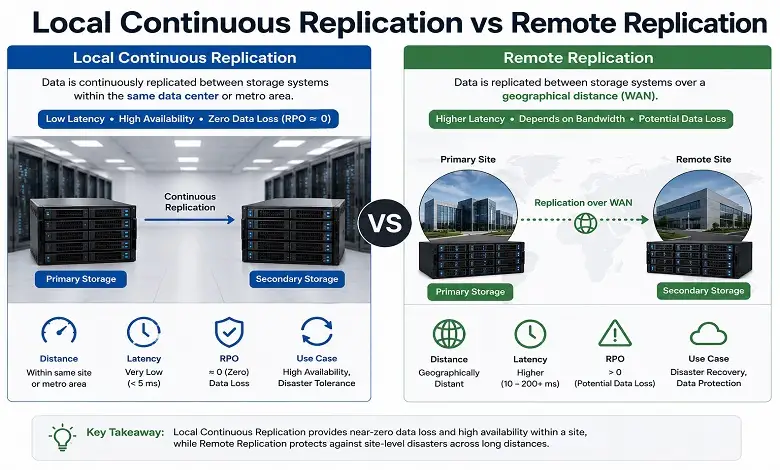
Many organizations confuse these two technologies.
Local Continuous Replication
- Replica remains in the same location
- Faster synchronization
- Lower latency
- Rapid failover
Remote Replication
- Replica stored at a different geographic location
- Better disaster recovery protection
- Protection from regional disasters
- Higher network requirements
Most enterprise environments deploy both solutions together.
Major Benefits of Local Continuous Replication
1. Near-Zero Data Loss
Since updates are replicated continuously, organizations can achieve extremely low Recovery Point Objectives.
2. Faster Disaster Recovery
Businesses can restore operations within minutes instead of hours.
3. Improved Business Continuity
Applications remain available even during hardware failures.
4. High Availability
Replication supports uninterrupted access to critical services.
5. Better System Reliability
Multiple copies of data reduce single points of failure.
6. Enhanced Operational Resilience
Organizations can continue functioning despite infrastructure disruptions.
Real-World Use Cases
Banking Systems
Financial institutions use replication to ensure transaction integrity and prevent data loss.
E-Commerce Platforms
Online retailers rely on replication to protect customer orders and payment information.
Healthcare Organizations
Hospitals use replication to maintain access to patient records and medical applications.
SaaS Providers
Software companies leverage replication to achieve high uptime and meet service-level agreements.
Manufacturing Enterprises
Factories replicate operational data to maintain production continuity.
Can Local Continuous Replication Prevent Data Loss?
Not necessarily.
Replication reduces exposure to certain types of data loss, but it does not guarantee zero data loss.
Possible problems include:
- Replication delay
- Corrupted source data
- Accidental deletion
- Malicious modification
- Software errors
- Failed replication jobs
- Storage failure affecting both copies
For this reason, organizations should define realistic RPO requirements and combine replication with appropriate backup and retention policies.
Best Practices for Implementing Local Continuous Replication
Define Recovery Objectives
Establish:
- Recovery Point Objective (RPO)
- Recovery Time Objective (RTO)
These metrics guide infrastructure decisions.
Monitor Replication Performance
Track:
- Replication lag
- Throughput
- Error rates
- Storage utilization
Test Failover Regularly
Failover testing ensures recovery processes work during actual emergencies.
Encrypt Replication Traffic
Protect sensitive business information through encryption and authentication.
Combine Replication with Backup Solutions
Replication alone cannot protect against every scenario.
Backups remain essential for:
- Ransomware recovery
- Accidental deletions
- Long-term retention
- Compliance requirements
Common Challenges
Infrastructure Costs: Replication requires additional hardware and storage resources.
Complexity: Deployment and maintenance demand skilled IT teams.
Network Bottlenecks: Poor network performance can introduce replication lag.
Data Consistency Issues: Large-scale environments require careful synchronization management.
The Future of Local Continuous Replication
Emerging technologies are transforming replication strategies.
Key trends include:
- AI-driven monitoring
- Automated failover
- Intelligent workload balancing
- Hybrid cloud replication
- Edge computing integration
- Container-native replication
These innovations are making replication faster, smarter, and more efficient than ever before.
Conclusion
Local continuous replication has evolved from a specialized enterprise technology into a fundamental requirement for modern IT infrastructure. As organizations increasingly depend on uninterrupted access to data, real-time replication provides the availability, resilience, and protection needed to support business-critical operations.
By continuously synchronizing data between systems, organizations can reduce downtime, achieve near-zero data loss, improve disaster recovery capabilities, and strengthen overall business continuity. When combined with robust backup strategies and proactive monitoring, local continuous replication forms the foundation of a reliable and future-ready data protection framework.
This structure is much stronger for ranking because it covers the topic comprehensively, targets multiple search intents, includes comparison sections, FAQs, semantic SEO entities, and naturally incorporates the primary keyword throughout the article.
FAQs:
Q: What is Local Continuous Replication?
A. Local Continuous Replication is a method of continuously maintaining a copy of data on separate local storage. The term is particularly associated with Microsoft Exchange Server 2007, where LCR maintained a passive copy of an Exchange storage group.
Q: How does Local Continuous Replication work?
A. In the traditional Exchange LCR model, transaction logs generated by the active database were copied to the passive location and replayed against the replica. This kept the secondary copy close to the production database.
Q: Is Local Continuous Replication the same as backup?
A. No. Replication and backup have different purposes. Replication primarily helps maintain availability and provide a recent recovery copy, while backups provide independent and often longer-term recovery points.
Q: Does LCR protect against hardware failure?
A. It can protect against certain storage failures when the active and passive copies are appropriately separated. However, a failure affecting the entire server or physical site can still affect both copies.
Q: Can replication replace a backup?
A. No. Replication should generally be treated as a complement to backup rather than a complete replacement.
Q: What are RPO and RTO?
A. RPO defines how much data loss an organization can tolerate, while RTO defines how quickly the service needs to be restored after an incident.
Q: Can local replication protect against ransomware?
A. Not by itself. Malicious or corrupted changes can potentially be replicated. Independent, isolated, or immutable backups are important components of ransomware-resilient recovery planning.
Q: Is Local Continuous Replication still a Microsoft Exchange feature?
A. LCR was an Exchange Server 2007 feature. Exchange Server 2010 replaced the earlier LCR/CCR/SCR models with Database Availability Groups.
Q: What is the main benefit of local replication?
A. The primary benefit is faster recovery from certain failures because a recent replica is already available locally.
Q: What is the biggest limitation of local replication?
A. The biggest limitation is that local copies may share the same physical or environmental risks as the production system. A separate geographic recovery copy may be required for protection against site-level disasters.