
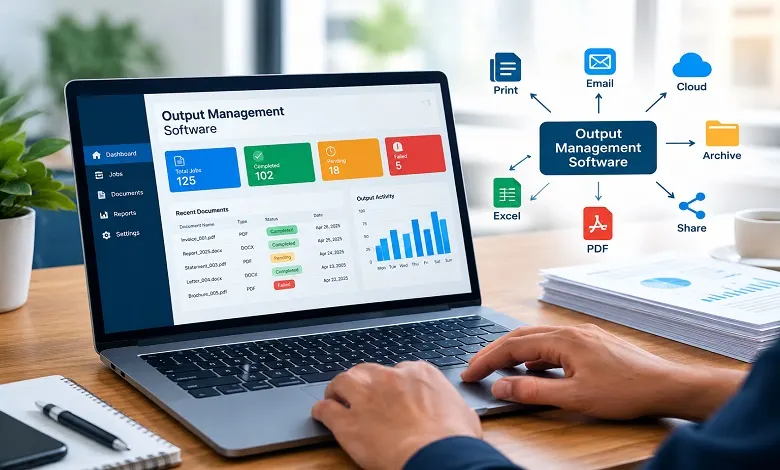
Businesses generate thousands of documents every day. Invoices, customer statements, reports, purchase orders, shipping documents, financial records, and other communications often need to be formatted, processed, delivered, and archived through different channels.
Handling all of this manually can become complicated as document volumes increase. Output management software helps organizations automate these processes by controlling how documents are prepared, routed, distributed, printed, and delivered.
For companies looking to improve document workflows, reduce manual processing, and manage multiple delivery channels from a centralized system, output management software can provide an important layer between business applications and the people or systems receiving their output.
What Is Output Management Software?
Output management software is a technology solution that manages the creation, processing, routing, and delivery of documents and other business outputs.
Instead of relying on employees to manually download a document, select a format, choose a recipient, print it, or send it by email, an output management solution can automate these steps using predefined rules.
For example, when an accounting system generates an invoice, the software can determine:
- Which customer should receive it
- Which document format should be used
- Whether it should be printed or delivered digitally
- Which delivery channel should be selected
- Whether a copy should be archived
- What should happen if delivery fails
This makes output management broader than simple print control. It can coordinate the movement of business documents across physical and digital channels.
How Does Output Management Software Work?
An output management system typically sits between an organization’s business applications and its final output channels.
A simplified workflow looks like this:
Business application → Document generation → Processing → Routing → Delivery → Tracking or archiving
A business application such as an ERP, CRM, accounting platform, healthcare system, or logistics application generates the information.
The output management software receives the output and applies predefined processing rules. It may then format the document, identify the appropriate recipient, select the delivery channel, and send the document.
For example:
Order system → Invoice generated → PDF created → Customer identified → Email delivered → Copy archived
The exact workflow depends on the software and the organization’s requirements.
Key Features of Output Management Software
A modern output management solution can include a wide range of features. The most useful capabilities depend on the organization’s document volume, applications, security requirements, and delivery processes.
1. Automated Document Routing
Document routing determines where an output should go after it has been generated.
Rules can be based on:
- Customer
- Document type
- Department
- Location
- Priority
- Business process
- Delivery preference
For example, invoices for one group of customers might be delivered electronically while documents requiring physical delivery are automatically sent to a designated printer.
2. Multi-Channel Document Delivery
Businesses no longer rely exclusively on printed documents.
Depending on the platform, output can be distributed through:
- Customer portals
- Electronic data exchange
- Digital repositories
- Other integrated communication channels
This gives organizations greater flexibility when deciding how different types of documents should reach their recipients.
3. Document Formatting and Transformation
Different recipients and systems may require different document formats.
Output management software can help process or transform documents into formats such as:
- XML
- Text
- CSV
- Other application-specific formats
This can be particularly useful when one business application produces output that must be delivered through several different channels.
4. Workflow Automation
Document workflow automation reduces repetitive manual tasks.
A typical automated workflow could be:
Generate → Validate → Format → Route → Deliver → Track → Archive
Rules can determine what happens at each stage. This helps organizations create consistent document-processing workflows across departments.
5. Print and Output Queue Management
Organizations that still depend on physical documents can use output management software to organize print jobs and control where they are sent.
Instead of employees manually selecting printers, rules can route specific documents to the appropriate device or production environment.
This can be particularly useful for organizations producing large volumes of statements, invoices, reports, labels, or operational documents.
6. Document Tracking and Monitoring
When thousands of documents are processed, knowing whether an output was successfully delivered becomes important.
Depending on the solution, administrators may be able to monitor:
- Processing status
- Delivery status
- Failed jobs
- Print queues
- Errors
- Document volumes
- Workflow activity
Monitoring can make it easier to identify problems before they affect customers or internal operations.
7. Security and Access Controls
Business documents may contain sensitive financial, personal, operational, or customer information.
Output management software can support security measures such as:
- User permissions
- Authentication
- Controlled document access
- Secure delivery
- Encryption
- Audit information
The available security capabilities vary between products, so organizations should evaluate them according to their regulatory and business requirements.
Benefits of Output Management Software
Reduces Manual Document Processing
Automating repetitive tasks can reduce the amount of time employees spend formatting, downloading, printing, emailing, and distributing documents.
Improves Operational Efficiency
Centralized workflows can make document processing more consistent across departments and applications.
Reduces Distribution Errors
Automated routing rules can reduce mistakes such as sending a document to the wrong department, printer, or delivery channel.
Supports Digital Transformation
Businesses moving away from paper-based processes can use output automation to introduce more digital delivery options.
Provides Centralized Control
Instead of managing document output separately within multiple applications, organizations can create centralized rules for processing and delivery.
Helps Manage High Document Volumes
Manual document handling becomes increasingly difficult as output volume grows. Automation allows businesses to process large numbers of documents using predefined workflows.
Output Management Software vs. Print Management Software
Output management software and print management software are related but serve different purposes.
Print management generally focuses on controlling printing resources, printers, users, print jobs, and printing costs.
Output management has a broader scope. It can determine how business documents are processed and delivered across both physical and digital channels.
| Output Management | Print Management |
| Manages overall document output | Primarily manages printing |
| Supports digital and physical delivery | Mainly focused on printers |
| Can automate document routing | Controls print jobs and resources |
| Can integrate with business applications | Often focuses on printing infrastructure |
| Supports broader document workflows | Primarily supports print workflows |
The two technologies can also work together. An organization might use print management to control its printer environment while using an output management system to decide which documents should actually be printed.
Types of Output Management Solutions
Output management can be implemented in different ways depending on the organization’s environment.
Enterprise Output Management
Large organizations may require centralized control over document workflows across multiple departments, locations, and business applications.
Cloud-Based Output Management
Cloud-based solutions can provide document-processing capabilities without requiring all infrastructure to be hosted on local servers. They may be useful for organizations with distributed teams or cloud-based applications.
On-Premises Output Management
Organizations with strict infrastructure or data requirements may choose software hosted within their own environment.
Hybrid Output Management
Some businesses combine cloud and on-premises technologies to support different applications, data requirements, and delivery channels.
The best approach depends on the organization’s technical environment, security requirements, document volume, and existing systems.
Common Uses of Output Management Software
Banking and Financial Services
Banks can use automated document workflows for statements, notices, reports, and customer communications.
Healthcare
Healthcare organizations may process reports, communications, and other documents that require controlled distribution.
Manufacturing
Manufacturers generate purchase orders, invoices, shipping documents, production reports, and other operational outputs.
Logistics and Transportation
Logistics organizations often handle invoices, shipping documents, delivery information, labels, and customer communications.
Retail and E-commerce
Retail businesses can automate invoices, order confirmations, receipts, statements, and customer notifications.
Large Enterprises
Organizations with multiple departments and business applications can benefit from centralized document output management.
How to Choose Output Management Software
Selecting an output management solution requires more than comparing feature lists.
Consider these factors before making a decision:
Integration
Can the software integrate with your ERP, CRM, accounting, logistics, healthcare, or other core applications?
Scalability
Can the platform handle your current document volume and future growth?
Delivery Channels
Does it support the channels your customers and employees actually use?
Automation
Can you create rules for document routing, formatting, processing, and delivery?
Security
Does the solution provide the security and access controls required for your type of information?
Monitoring
Can administrators identify failed jobs and monitor document-processing activity?
Administration
Is it practical for your IT and operations teams to manage?
Output Management Software and Business Automation
Output management is increasingly connected with broader business automation.
Instead of treating document creation and distribution as separate manual tasks, organizations can connect output workflows with their existing business processes.
For example:
Customer places order → Order processed → Invoice generated → Document formatted → Output routed → Customer notified → Document archived
This approach can reduce manual intervention while creating a more consistent experience across departments and customer touch points.
Final Thoughts
Output management software provides organizations with a centralized way to control document processing and distribution. By automating routing, formatting, delivery, monitoring, and other repetitive tasks, it can help businesses create more efficient and consistent document workflows.
The right solution depends on the organization’s applications, document volume, delivery requirements, security needs, and operational processes.
For businesses considering a broader output management system, understanding the software, workflows, integration, and delivery options is an important first step toward building an efficient document-output strategy.
Frequently Asked Questions
Q: What is output management software used for?
A. Output management software is used to automate and control how business documents are processed, routed, printed, digitally delivered, monitored, and archived.
Q: What is the difference between output management and document management?
A. Document management generally focuses on storing, organizing, accessing, and managing documents. Output management focuses on how documents and other business outputs are processed and delivered to their intended destinations.
Q: Is output management software only for printing?
A. No. Modern output management can support both physical and digital delivery. Depending on the solution, documents may be printed, emailed, delivered through portals, exchanged electronically, or sent to other integrated systems.
Q: Who needs output management software?
A. It can be useful for organizations that generate large volumes of documents, particularly financial institutions, healthcare providers, manufacturers, logistics companies, retailers, and large enterprises.
Q: Can output management software integrate with ERP systems?
A. Many output management platforms are designed to integrate with enterprise applications such as ERP and CRM systems. The specific integration available depends on the software provider.