
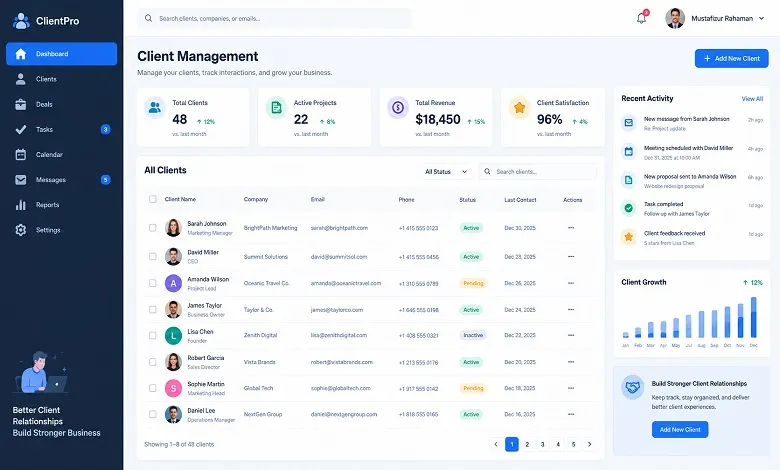
A client management interface gives businesses a centralized way to organize client information, manage ongoing work, share documents, track progress, and coordinate communication. Instead of switching between emails, spreadsheets, project management tools, and shared folders, teams can use a connected workspace to understand each client relationship and identify what needs attention next.
For agencies, consultants, financial service providers, and other client-focused businesses, this visibility can make everyday operations easier to manage. Teams can follow onboarding progress, assign responsibilities, monitor deadlines, and keep important client information accessible to authorized people. Clients also benefit when they know which documents to submit, which tasks remain incomplete, and when they can expect an update.
However, not every interface offers the same capabilities. Some focus on client onboarding and document collection, while others connect client records with project delivery, time tracking, invoicing, or business reporting.
What Is a Client Management Interface?
A client management interface is a digital workspace where businesses organize client-related information and coordinate activities throughout a professional relationship. Depending on the platform, it may provide a dashboard for internal teams, a secure area for clients, or a combination of both.
The interface can bring together contact details, project updates, document requests, messages, approvals, tasks, deadlines, and performance information. Instead of asking several employees for updates or searching through old email conversations, authorized team members can access relevant information from a central location.
Consider a digital marketing agency managing several clients. One client needs monthly SEO reports, another is waiting for a website redesign, and a third has outstanding invoices. Without a structured system, account managers might need to check different tools to understand each situation. A well-organized client management interface can present the relevant tasks, project status, communication history, and financial information in a single view, provided the platform supports those functions.
The main purpose is consistent across these use cases: make client information easier to access, reduce avoidable administrative work, and help teams deliver a more organized client experience.
Why Businesses Need a Client Management Interface
Client relationships become harder to manage as the number of accounts, projects, and communication channels increases. Information can become scattered, responsibilities may be unclear, and simple requests can take longer than expected because employees must reconstruct the current situation.
A client management interface addresses these challenges by giving teams a more consistent way to organize work.
Centralized Client Information
When contact details, important documents, meeting notes, and current tasks are stored across different systems, employees may struggle to find accurate information quickly.
A centralized interface provides a common reference point for client-related activity. Team members can review relevant records, understand previous decisions, and continue work without relying entirely on individual email histories or personal spreadsheets.
Access controls are important here. Sensitive information should be visible only to people who need it for their roles.
Better Communication and Coordination
Missed messages and unclear responsibilities can lead to repeated questions, delayed approvals, and frustrated clients. A shared interface can connect messages and updates to the relevant client, project, or onboarding step.
For example, if a client uploads a requested document, the assigned employee can review it and update its status. The client and internal team can then see what happens next, depending on the system’s notification and collaboration features.
This creates a clearer process and reduces the need for unnecessary follow-up messages.
More Efficient Client Onboarding
Onboarding often requires several steps, including collecting information, verifying documents, signing agreements, and obtaining internal approvals. Managing these activities manually can create bottlenecks, especially when different people are responsible for different stages.
A client management interface can organize onboarding through checklists, forms, document requests, assigned tasks, and deadlines. Workflow automation may also send reminders or move a case to the next stage after a required action is completed.
The result is a more consistent process that is easier to monitor and improve.
Greater Visibility into Client Work
Business owners and account managers need to know which tasks are complete, which deadlines are approaching, and which client relationships require attention.
Depending on the platform, dashboards can display project status, pending approvals, overdue tasks, onboarding progress, and other useful indicators. Solutions designed for agencies may also connect delivery information with budgets, logged hours, and profitability.
This visibility helps managers prioritize work based on actual needs rather than relying on occasional status reports.
Key Features of an Effective Client Management Interface
The most useful interface is not necessarily the one with the largest number of features. It is the one that supports the organization’s daily processes without creating unnecessary complexity.
Before selecting a platform, evaluate the following capabilities.
1. A Clear Client Dashboard
A dashboard should help users understand the current state of a client relationship without navigating through numerous screens.
Depending on the business, it may display contact information, active projects, pending tasks, upcoming deadlines, recent messages, outstanding documents, and approval status.
For an agency, the dashboard may also include delivery milestones and financial information. For a professional service provider handling applications, it may emphasize document completeness, verification, and onboarding progress.
Prioritize a layout that makes important information easy to find and highlights actions that require attention.
2. Contact and Relationship Management
Reliable client records are essential for maintaining continuity. An interface should allow authorized users to maintain contact details, relevant notes, communication history, preferences, and important relationship information.
For business-to-business relationships, it may also be useful to associate multiple contacts with one organization and identify their roles in specific projects or decisions.
Look for duplicate detection, searchable records, and a straightforward process for updating outdated information. These details help prevent confusion when accounts change hands or new employees join the team.
3. Task and Project Tracking
Client work frequently involves several activities with different owners and deadlines. Task management features help teams assign responsibilities, establish due dates, track completion, and identify overdue work.
Project-based businesses may also need milestone tracking, dependencies, time logging, and progress reporting. Onboarding-focused teams may need approval stages and document review tasks instead.
The interface should make it clear who owns the next action and what must happen before a process can move forward.
4. Secure Document Management
Client relationships often involve confidential contracts, financial information, identity documents, proposals, and other sensitive files.
A suitable interface should provide controlled document access, clear file organization, and reliable methods for uploading, reviewing, and sharing information. Depending on the use case, version history, approval records, and electronic signatures may also be valuable.
Evaluate how the platform handles permissions, data encryption, retention, backups, and deletion. Businesses that process sensitive or regulated information should review the provider’s security documentation and confirm that its controls meet their requirements.
5. Communication and Automated Reminders
Communication tools can help teams keep discussions connected to the work they concern. Depending on the platform, users may be able to send messages, add internal comments, record meeting notes, and view previous interactions.
Automated reminders are particularly useful for recurring processes such as document collection, contract approvals, appointment confirmations, and overdue tasks.
Automation should be configurable rather than excessive. Clients need relevant updates, not repeated notifications that make the process feel impersonal.
6. Workflow Automation
Workflow automation helps standardize processes that follow predictable steps. For example, completing a client registration form could trigger a document request, assign a review task, and notify the responsible employee.
Templates can help teams repeat successful processes without rebuilding every step manually. Conditional rules may also allow different clients to follow different paths based on their circumstances.
Before automating a workflow, document the existing process and resolve unnecessary steps. Automating a confusing process can make its problems happen faster rather than solving them.
7. Reporting and Performance Insights
Reporting helps managers identify delays, understand workloads, and evaluate whether client processes are working as intended.
Useful measures may include onboarding completion time, overdue tasks, outstanding approvals, project delivery performance, response times, and client retention. Agencies may also benefit from budget utilization, time tracking, and account profitability.
Choose reports that support specific decisions. A dashboard filled with numbers is not useful if managers cannot determine what action to take from them.
8. Integration and Access Controls
A client management interface should work with the systems the business already uses. Depending on the platform, integration may connect email, calendars, accounting applications, CRM software, cloud storage, or project management tools.
Integration quality matters because disconnected systems can continue creating duplicate records and manual work. Confirm which data is synchronized, how often updates occur, and how errors are handled.
Role-based permissions are equally important. Internal staff, managers, external partners, and clients should have access only to the information and actions appropriate to them.
Client Management Interface vs. CRM vs. Client Portal
These terms are related, but they do not always describe the same thing. Understanding the differences helps businesses choose software that fits their needs.
| Feature | Client management interface | CRM software | Client portal |
| Primary purpose | Organize client-related information and workflows | Manage customer relationships and sales activities | Give clients a secure place to access information and complete tasks |
| Typical users | Internal teams and, where supported, clients | Sales, marketing, and account teams | Clients and authorized external users |
| Common features | Dashboards, tasks, documents, communication, workflow tracking | Contact records, leads, deals, sales pipeline | File sharing, forms, messages, requests, status updates |
| Main focus | Client coordination and service delivery | Customer acquisition and relationship tracking | Client access and collaboration |
| Scope | Varies by platform | Often centred on sales and relationship data | Usually focused on client-facing interactions |
A CRM can support client management, and many modern platforms include project tracking, automation, or portal features. Similarly, a client portal may be part of a broader client management system rather than a separate product.
The best choice depends on the primary problem. Businesses struggling with sales follow-ups may need a stronger CRM. Organizations dealing with document collection and approvals may prioritize a client portal and workflow tools. Agencies coordinating projects, time, and budgets may need an interface that connects client records with delivery and financial information.
How to Choose the Right Client Management Interface
Choosing software based only on a feature list can lead to unnecessary spending and poor adoption. A more effective approach starts with the problems the business needs to solve.
Identify Your Current Bottlenecks
Review the activities that consume the most time or create the most errors. These might include repeatedly requesting documents, searching for client information, preparing manual reports, coordinating approvals, or updating several systems.
Ask employees who handle client relationships where work slows down and which information they regularly struggle to find. Their feedback will help define practical requirements.
Match Features to Your Business Model
Different organizations have different needs. A consultancy may prioritize project visibility, time-sheets, and budgets, while an accounting firm may need secure document collection, approval workflows, and clear audit records.
Create a shortlist of essential features and distinguish them from optional extras. This prevents the selection process from being dominated by attractive features that the team may rarely use.
Evaluate Ease of Use
An interface should make common tasks straightforward. During a demonstration or trial, test real activities such as creating a client record, assigning a task, requesting a document, updating a status, and finding a previous conversation.
Consider whether employees and clients can complete these actions with minimal assistance. A technically powerful platform may deliver little value if users find it difficult to navigate.
Review Security and Data Handling
Before storing client information, examine how the provider manages access permissions, encryption, backups, incident response, data export, and deletion.
Check the contractual terms and applicable privacy requirements. If your business operates in a regulated industry, verify whether the solution supports the controls and records your organization needs.
Do not assume that a software provider meets every legal or security requirement simply because it advertises compliance features.
Check Integration and Total Cost
Review whether the platform connects to your existing systems and whether those integrations are included in the plan you intend to purchase.
Compare the full cost, including user licenses, implementation, migration, training, storage, premium integration, and ongoing administration. A lower subscription price may not translate into a lower overall cost if the system requires substantial manual work.
Test the Solution with a Small Team
A limited pilot can reveal problems before the software is introduced across the organization. Use real workflows with appropriate safeguards, collect feedback, and measure whether the solution reduces delays or improves visibility.
Choose a platform based on the results of the trial, not just the sales demonstration.
Best Practices for Implementing a Client Management Interface
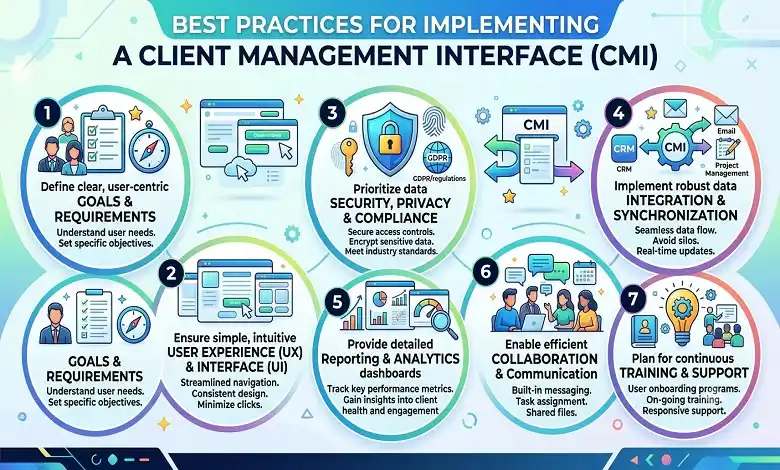
Successful implementation requires clear processes and team participation, not just software installation.
Start with clean client records. Remove unnecessary duplicates, correct outdated details, and establish consistent naming conventions before importing information.
Standardize repeatable workflows. Document common activities such as onboarding, document review, project handover, and account closure. Use templates where they improve consistency.
Assign clear ownership. Every important task should have a responsible person, a defined outcome, and a realistic deadline.
Set permissions carefully. Give employees and clients access only to the records and functions they need. Review permissions when responsibilities change.
Train employees using real tasks. Demonstrate how to update client records, manage tasks, share documents, and report issues. Short, role-specific training is often more useful than a long feature overview.
Monitor meaningful results. Track a small set of indicators, such as overdue tasks, onboarding completion time, or time spent preparing client updates. Compare performance before and after implementation where reliable baseline data is available.
Review the process regularly. Gather feedback from both staff and clients. Remove unnecessary steps, adjust notifications, and update workflows as business needs evolve.
Common Mistakes to Avoid
Even a well-chosen client management interface can underperform when the underlying processes are poorly managed.
One common mistake is trying to manage everything through one dashboard without defining which information is important. Keep the interface focused on the tasks and decisions users need to handle.
Another problem is automating workflows before standardizing them. If employees follow different procedures for the same activity, automation may reinforce those inconsistencies. Agree on a clear process first.
Businesses may also neglect data quality during migration. Duplicate records and outdated contact details reduce trust in the system and make reporting less reliable.
Finally, avoid ignoring client feedback and access needs. If clients cannot understand the next step or struggle to submit information, they may return to email and other informal channels. A successful interface should make collaboration easier for both sides.
Frequently Asked Questions
Q: What is a client management interface used for?
A. A client management interface helps businesses organize client records, communication, documents, tasks, and ongoing workflows in a centralized workspace. Depending on the software, it can also support onboarding, project delivery, reporting, and financial tracking.
Q: Is a client management interface the same as a CRM?
A. Not necessarily. A CRM typically focuses on customer information, sales opportunities, and relationship history. A client management interface may extend into service delivery, document exchange, onboarding, task management, and client collaboration. However, modern platforms can combine these capabilities.
Q: Who can benefit from a client management interface?
A. Agencies, consultants, accounting firms, financial service providers, legal practices, and other client-focused organizations can benefit from a structured interface. It is particularly useful when multiple employees handle the same accounts or when clients must complete several steps before a service can begin.
Q: What features should a client management interface have?
A. Core features may include a client dashboard, contact records, task tracking, document management, communication history, workflow automation, reporting, integration, and access controls. The right combination depends on the organization’s workflow, security requirements, and service model.
Q: Can a client management interface improve client onboarding?
A. Yes. A suitable system can organize document requests, forms, approvals, deadlines, and reminders into a consistent process. This makes it easier for employees to identify missing information and for clients to understand what they need to do next. Actual improvements depend on the quality of the workflow and how well the system is implemented.
Q: How is a client management interface different from a client portal?
A. A client portal usually provides an external space where clients can access files, submit information, communicate with a business, or check progress. A client management interface is a broader concept that may include internal dashboards, workflow management, reporting, and the client-facing portal itself.
How do you measure the success of a client management interface?
Measure results against the problems the business originally identified. Useful indicators include onboarding completion time, overdue tasks, document turnaround, time spent preparing updates, client response rates, and user adoption. Agencies may also track delivery performance and profitability if the platform supports those metrics.
Conclusion
A well-designed client management interface helps businesses organize client information, coordinate responsibilities, and make service delivery more transparent. By bringing relevant records, tasks, documents, communication, and progress updates together, it can reduce administrative friction and help teams respond more consistently to client needs.
The right solution depends on the organization’s priorities. Some businesses need structured onboarding and secure document collection, while others require project visibility, reporting, or connections between client relationships and financial performance.
Start by identifying the bottlenecks in your current process, then evaluate platforms against practical requirements, ease of use, integration, security, and total cost. With clean data, clearly defined workflows, and regular reviews, a client management interface can become a valuable part of a more organized and reliable client experience.