
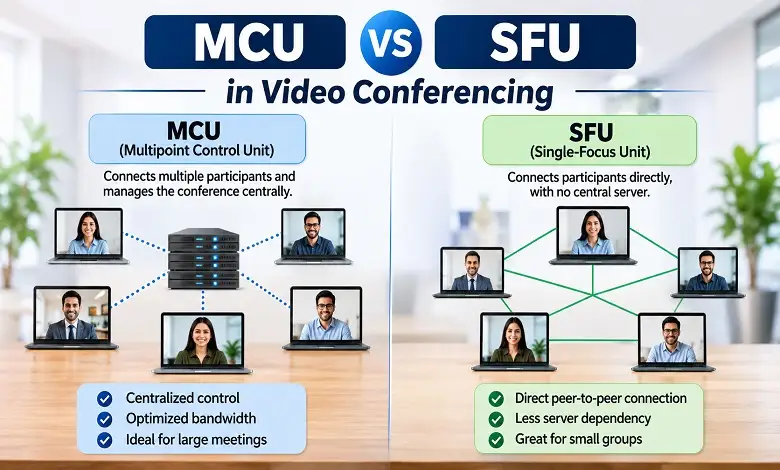
Video conferencing technology has changed how businesses, educational institutions, and organizations communicate. Behind these virtual meetings, different media server architectures manage audio and video streams to provide a smooth communication experience. Two commonly used approaches are the Multi point Control Unit (MCU) and the Selective Forwarding Unit (SFU). Understanding MCU vs SFU is important when choosing a video conferencing architecture. Both technologies allow multiple participants to communicate in the same meeting, but they handle audio and video streams differently. An MCU processes and combines media streams, while an SFU selectively forwards individual streams to participants.
This guide explains how MCU and SFU architectures work, their main differences, advantages, limitations, and the situations in which each approach may be suitable.
What Is an MCU in Video Conferencing?
A Multi point Control Unit (MCU) is a conferencing system designed to connect multiple participants in a single audio or video conference. It receives media streams from connected users and processes them before distributing the resulting media to participants.
Depending on its capabilities, an MCU can mix audio from different participants, combine video feeds into a single layout, and handle media compatibility requirements.
For example, imagine a business meeting with eight employees joining from different locations. An MCU can process their video and audio streams and create a combined conference view. Participants can then see several people within one video layout rather than managing every incoming stream separately.
MCU architecture is often useful in environments where centralized media processing and consistent video layouts are important.
What Is an SFU in Video Conferencing?
A Selective Forwarding Unit (SFU) is a media server architecture that receives audio and video streams from participants and selectively forwards them to other participants.
Unlike an MCU, an SFU generally does not combine all video streams into one centrally composed video. Instead, it forwards selected streams, allowing receiving devices to handle tasks such as displaying multiple video feeds and choosing the appropriate quality level.
For example, in a video meeting with eight participants, an SFU may forward individual video streams to the connected users. Each participant’s device can then display the streams according to the meeting interface and available network resources.
SFUs are commonly used in real-time communication applications that require flexible media distribution and efficient handling of multiple video streams.
MCU vs SFU: Key Differences
Although both architectures support multi-party video conferencing, their media-processing methods are different.
| Comparison Factor | MCU | SFU |
| Full form | Multipoint Control Unit | Selective Forwarding Unit |
| Main function | Processes and combines media streams | Selectively forwards media streams |
| Video processing | Can create combined video layouts | Usually forwards individual video streams |
| Audio processing | Can mix audio centrally | Generally forwards separate audio streams |
| Processing location | More media processing happens on the server | More media handling may happen on participant devices |
| Bandwidth requirements | Depends on the processed output and system design | Depends on the number and quality of forwarded streams |
| Server resources | Can require significant processing resources | Primarily handles stream routing and forwarding |
| Common use | Centralized conferencing and composite layouts | Interactive meetings and flexible real-time communication |
Actual performance depends on implementation, codecs, participant devices, network conditions, and system configuration. Neither architecture is automatically better for every conferencing application.
How Does an MCU Work?
An MCU uses centralized media processing to manage communication between multiple participants.
The general process involves the following steps:
- Participant connection: Users join a video conference through compatible devices or conferencing applications.
- Media reception: The MCU receives audio and video streams from connected participants.
- Conference management: Its control functions manage the conference session and communication between participants.
- Media processing: The system can mix audio, combine video feeds, and perform supported media-processing operations.
- Media distribution: The processed audio and video are delivered to participants.
This architecture allows the conferencing system to manage media centrally. It can be particularly useful when participants need to view a consistent video layout.
How Does an SFU Work?
An SFU follows a different process. Rather than centrally combining all video feeds, it receives individual media streams and forwards selected streams to the appropriate participants.
A typical SFU workflow includes:
- Participant connection: Users connect to the conferencing application.
- Stream reception: The SFU receives audio and video streams from participants.
- Stream selection: It determines which streams should be forwarded based on subscription choices and application requirements.
- Stream forwarding: Selected streams are sent to other participants.
- Client-side presentation: Each participant’s device displays the received streams according to the application’s interface.
This approach allows applications to control which streams users receive. Some SFU implementations also support simulcast or scalable video coding to help adapt media quality to different network conditions.
Advantages of MCU Architecture
MCU technology offers several benefits for organizations that need centralized conference processing.
1. Centralized media processing
An MCU handles important media-processing tasks on the server side. This can simplify the media requirements of participant devices, depending on the implementation.
2. Combined video layouts
MCUs can create composite video layouts that display multiple participants in one output. This is useful for traditional conference room systems and meetings that require a consistent viewing arrangement.
3. Centralized audio mixing
An MCU can combine audio from multiple participants into a single output, helping deliver a coordinated conference experience.
4. Media compatibility
Some MCU systems support media transcoding and format conversion, allowing participants with different media capabilities to communicate. Available functionality depends on the product.
5. Managed conferencing experience
Centralized processing can make it easier to control the presentation and media distribution of a conference.
Advantages of SFU Architecture
SFU architecture is popular in modern real-time communication applications because it provides flexible media distribution.
1. Flexible stream delivery
An SFU can forward selected streams based on the needs of each participant. Users do not necessarily need to receive every available video stream.
2. Reduced server-side media processing
Since an SFU generally forwards streams instead of combining them into a composite video, it can reduce the need for certain types of server-side media processing.
3. Support for adaptive video quality
Many SFU implementations support simulcast or scalable video techniques. These features allow applications to select suitable video quality based on network conditions and device capabilities.
4. Interactive communication
SFUs are useful for applications where participants need to receive individual video streams and interact with multiple people.
5. Flexible application design
Developers can create customized layouts and participant experiences by controlling which media streams are delivered to each user.
Read Also: Social Media Stuff EmbedTree: Meaning, Features, Benefits, and How to Use It
MCU vs SFU: Which One Is Better?
There is no universal winner when comparing MCU vs SFU. The right choice depends on the application’s media requirements, infrastructure, expected number of participants, and available network resources.
An MCU may be a suitable option when:
- A centrally combined video layout is required.
- Audio needs to be mixed on the server.
- A consistent conference output is important.
- Existing conferencing equipment requires MCU compatibility.
- Centralized media processing fits the organization’s infrastructure.
An SFU may be more suitable when:
- Applications need to forward individual participant streams.
- Users need flexible video layouts.
- Adaptive video quality is important.
- The application supports client-side media presentation.
- Developers need flexible control over stream distribution.
Organizations should also evaluate security, reliability, scalability, latency, and operating costs before selecting an architecture.
Can MCU and SFU Be Used Together?
Yes. Some conferencing platforms use hybrid architectures that combine MCU and SFU capabilities.
For example, a system may use an SFU to distribute individual video streams during a regular meeting while using MCU-style processing to create a composite video output for a recording, broadcast, or conference endpoint.
This type of design can provide flexibility when an application needs both individual stream delivery and centralized media processing.
However, hybrid systems introduce additional architectural complexity. Developers must consider processing requirements, media routing, compatibility, and overall system performance.
Factors to Consider When Choosing a Video Conferencing Architecture
Before selecting an MCU or SFU, evaluate the following factors:
Participant capacity: Estimate how many users may join a meeting simultaneously and whether the system can support expected growth.
Audio and video quality: Consider resolution, frame rate, audio clarity, and the quality requirements of different participants.
Network bandwidth: Evaluate upload and download bandwidth, especially when participants use different internet connections.
Device capabilities: Determine whether participant devices can handle the required media processing and multiple video streams.
Scalability: Choose an architecture that can support future growth without creating unnecessary infrastructure costs.
Security: Review encryption, access controls, authentication, and data protection requirements.
Integration: Check compatibility with existing conferencing platforms, communication protocols, and hardware.
Frequently Asked Questions
Q: What is the main difference between MCU and SFU?
A. The main difference is how they handle media streams. An MCU processes and can combine audio and video streams centrally, while an SFU selectively forwards individual media streams to participants.
Q: Is an SFU better than an MCU?
A. An SFU can be a better choice for applications that need flexible stream forwarding and individual video feeds. An MCU may be more suitable when centralized audio mixing and combined video layouts are required. The best option depends on the application.
Q: Does an SFU mix video streams?
A. Generally, no. An SFU forwards selected individual video streams rather than combining them into a single composite video. The receiving application typically manages how those streams are displayed.
Q: Does an MCU require more server resources?
A. MCUs can require significant server resources because they may decode, process, mix, and encode media streams. Actual resource consumption depends on participant numbers, codecs, video quality, and the system’s design.
Q: Which architecture is suitable for large video conferences?
A. Both MCU and SFU architectures can support large conferences when properly designed and scaled. The choice depends on media processing requirements, participant behavior, bandwidth, infrastructure, and the desired user experience.
Q: Can an SFU support multiple video participants?
A. Yes. An SFU can forward multiple participant video streams to a user. The receiving device or application can display them in a grid, gallery, or another layout.
Q: Are MCU and SFU used in WebRTC?
A. Yes. Both MCU-style and SFU architectures can be used in WebRTC-based communication systems. The appropriate approach depends on the application’s media processing and distribution requirements.
Conclusion
Understanding the difference between MCU and SFU is essential when designing or selecting a video conferencing system. Both architectures enable multi-party communication, but they use different approaches to manage audio and video streams.
An MCU provides centralized media processing and can create combined video layouts, making it useful for managed conferencing environments. An SFU focuses on selectively forwarding individual streams, offering flexibility for modern real-time communication applications.
Before choosing between them, consider participant capacity, media quality, network conditions, server resources, security, and scalability. Selecting the right architecture can help create a reliable video conferencing experience while meeting the technical and operational requirements of the organization.